

OMERO at the University of Arizona
OMERO is designed for Scientists

Has your lab ever had to hunt for missing image data? Perhaps, because it was stored or labeled so poorly that it might as well have been lost?
As of 2023, the NIH is requiring all new proposals to have a data management and sharing plan. OMERO @ U of A offers a secure, routinely backed up, online location to safely store scientific image data.
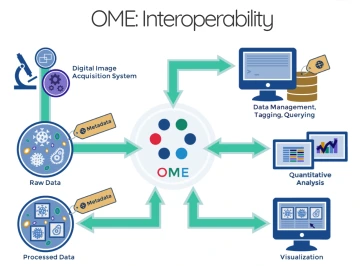
From the microscope to publication, OMERO (https:// www.openmicroscopy.org) handles all your lab's image data in a secure central repository. With OMERO you can view, organize, annotate, analyze, and share your data from anywhere that you have internet access. You can work with your images from a desktop app (Windows, Mac or Linux), from a web browser, or from 3rd party software. Over 160 image formats are supported using the BIO-FORMATS library, including all major microscope vendor file formats.
OMERO can handle data from basic lab microscopes to high-end core facility instruments, including high content screening, time-lapse, digital pathology (scanned microscope slides) and other complex multidimensional image formats.
There are estimated to be over 1,000 OMERO servers in use worldwide. OMERO and BIO-FORMATS are developed and supported by the Open Microscopy Environment, a 20 year old consortium of universities, research labs, industry and developers producing open-source software and format standards for microscopy data.
- IMPORT DATA - With the desktop application (Windows, MacOS, Linux) or by command line. BIO-FORMATS directly handles the proprietary file formats on import and retains the relevant metadata.
- ORGANIZE - View and organize your data from anywhere that you have internet access. In addition to imported metadata, labs can add additional information about the experiment, draw regions of interest, and annotate the images. The database is searchable with the ability to use keyword tagging.
- VIEW - Work with your images using the OMERO.insight desktop app, with OMERO.web in your browser, or from 3rd party software.
- ANALYZE - Use lmageJ, CellProfiler, QuPath, MATLAB, R, Python, scripts and other tools to run analysis on data in OMERO and save results on the server.
- SHARE - Share data with collaborators or your Pl using the Groups/Users permission system. The permissions system allows the Pl to control who is part of their group and who has access to specific datasets.
- PUBLISH - Publish direct from the server via a customized website or embedded viewer. Shared image data on an OMERO server can be configured to be complaint with the FAIR (https://www.nature.com/articles/ sdata201618) criteria ensuring that the data is findable, accessible, interoperable and reusable.
Why use OMERO?
With both of the major US funding agencies (NSF, NIH) now requiring a data management and sharing plan, University of Arizona microscope users are looking for ways to effectively store and make available their image data.
There are specific repositories for other types of data (e.g., software, genomics, etc.), but microscopy data can be very large (individual files and in aggregate). File sharing of image data can be a challenge, because not only are the data large, there are over 160 different proprietary image file formats. With initial financial support provided by the University of Arizona Strategic Plan (UAHS 5.3 Health Analytics Powerhouse) and the Data Science Institute, the university launched a local instance of the OMERO (Open Microscopy Environment Remote Objects) server for the storage, management and sharing of microscopy image data.
Appropriate data types for OMERO
Routine research image data (optical and electron microscopes, gel imagers, HCS, digital cameras, etc.) would be appropriate for OMERO. Human subjects-related data must be completely de-identified prior to uploading to the OMERO server.
Learning options
- An Introduction to OMERO, this presentation includes demonstrations of some of the software features (26 min).
- OMERO 101 - a three part series introducing OMERO from a user perspective, for faculty members and group leaders there is managing OMERO groups, and finally an overview of data management in OMERO (91 min total for all 3 videos)
- D2L videos from our two-day, hands-on OMERO training workshop (led by trainers from the OME) held in Aug 2023. These go into considerably more depth, approximately 13hrs of edited videos. Users with UA netIDs can request access. There is a post-workshop resource page available.
Examples of how is OMERO being used at the University of Arizona
- Dr. Clara Curiel-Lewandrowski (Dermatology, College of Medicine) and her team are storing de-identified images of patient skin lesions captured in a clinic, and using unique identifiers that connect the images with clinical data securely stored in RedCap as well as biospecimen information stored in OpenSpecimen. Using a custom Python script, their image data is sorted by diagnosis as it is uploaded into OMERO. The goal is to create a well annotated dataset that could be used for other research, including the use of artificial intelligence. Their project began in early 2023 and they already have commercial interest in some of the data. UA News did a story on the project in June 2023, see Revolutionizing skin cancer care through data.
- Dr. Jennifer Barton (Biomedical Engineering, College of Engineering) and her lab are collaborating with a group at the Baylor College of Medicine on a grant. Their data includes whole slide images (WSI) and Optical Coherence Tomography data. Their Baylor colleagues can access the image data using a web browser, as well as upload their own contributions to the project.
How can I get started?
- Reach out to us at RII-OMERO@arizona.edu with any questions that you may have.
- After an initial meeting to discuss the project, we will request a short project description document (we have a template).
OMERO project contact:
Doug Cromey, MS
Manager, Imaging Cores-Optical, ORP Core Facilities
(520) 626-2824 | dcromey@arizona.edu